
PLC vs Wi-Fi: why our monitoring runs over the DC cable
Ask any installer about panel-level monitoring and you'll hear the same complaint sooner or later: the data drops out, the customer sees gaps in their app, and somebody has to go back to site. More often than not the hardware is fine. The problem is the link from the roof to the router.
That's why Archai optimisers don't use Wi-Fi at all. They talk over the DC cable that's already there.
How it works
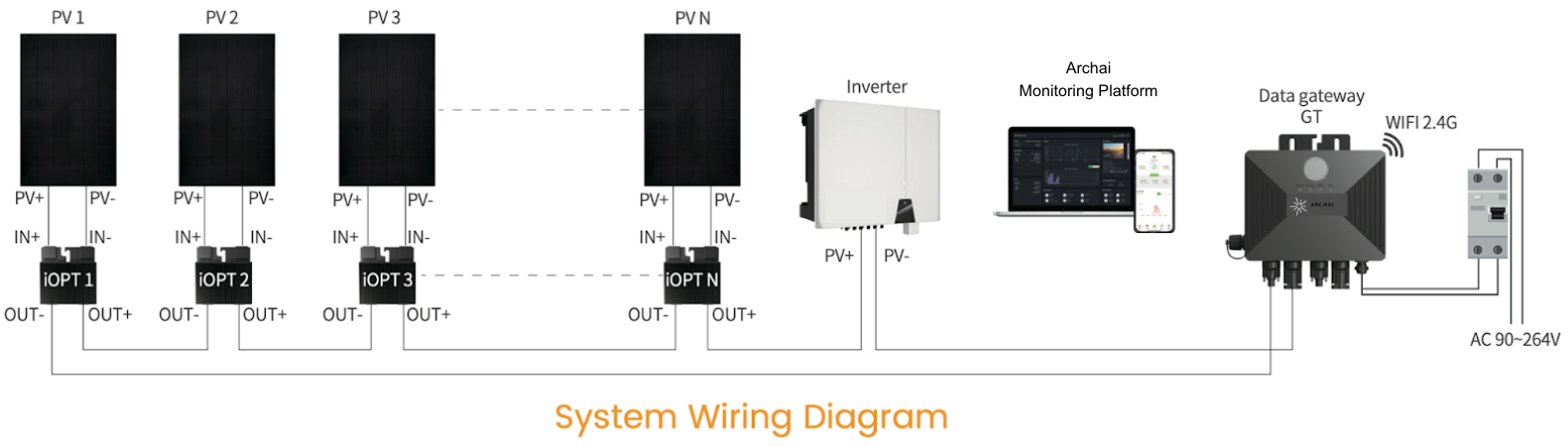
Each Archai iOPT 800W optimiser measures its panel: PV voltage, output voltage, current, power, temperature and state. It sends that data down the string's own DC cabling using power line communication (PLC), a signal carried on top of the DC power.
At the bottom of the string, the Archai GT gateway sits in series between the string and the inverter. It picks up the PLC signal from up to 30 optimisers, then passes the data on to SolarSync over 2.4 GHz Wi-Fi or a wired RS485 link. The GT is mounted near the inverter, so the only wireless hop is a short one to the customer's router, or none at all if you use RS485.
Why that matters
- No signal to lose on the roof. Tiles, insulation, steel and distance all weaken Wi-Fi. A DC cable doesn't care.
- No pairing, no passwords per panel. Optimisers don't join a network, so there's nothing to reconfigure when the customer changes router.
- Fewer callbacks. Most "my monitoring's stopped" calls aren't hardware faults. Removing the roof-to-router link removes most of them.
- Data and control on the same path. The same link that carries monitoring data also carries the shutdown signal from the GT to every optimiser.
Getting it right on install
PLC is robust, but a few habits make it bulletproof:
- One GT per string. Each GT talks to the optimisers on its own string, up to 30.
- Route the first OUT− through the GT's magnetic ring on its way to the inverter's PV− input. That ring is how the GT couples onto the string.
- Fill in the layout sheet. Stick each optimiser's serial label on the sheet at its panel position. That's how panels are mapped in SolarSync, and how you'll find a specific unit years from now.
- Wait for the self-test. After first power-up, give the system about 10 minutes before you judge the data.
What the customer sees
Once it's commissioned, SolarSync shows every panel's output live in the app and on desktop, with alerts if a panel stops reporting or under-performs.
If you'd like a SolarSync demo account to show customers, get in touch.
Spec Archai on your next job
Datasheets, trade pricing and compatibility checks for installers and distributors.